Write a company skill
Author a small Markdown bundle that any agent in your company can load on demand, install it into the company skill library, and attach it to the one or two agents that should actually use it. End-to-end on a fresh skill in about 10 minutes.
A skill is the right tool when you want a procedure, a code review checklist, a release-note format, a customer response template, to be available to multiple agents without baking it into every agent’s main instructions. It is not a place to ship code (that’s a plugin), and it is not a runtime bridge (that’s an adapter). If a smart human could follow the file as written and produce the right output, it’s a skill.
Architecture
Section titled “Architecture” ┌─────────────────────────┐ POST /skills/import ┌──────────────────────┐ │ skill source │───────────────────────▶│ Company skill library│ │ (SKILL.md + references) │ │ (one row per skill) │ └─────────────────────────┘ └──────────┬───────────┘ │ │ POST /agents/{id}/skills/sync ▼ ┌──────────────────────────┐ │ Agent's `desiredSkills` │ │ resolved on next heartbeat│ └──────────────────────────┘The skill lives once, in the company library. Each agent’s desiredSkills is just a list of references into that library. The runtime materialises the files only for agents that have the skill attached, on the adapters that support it.
1. Prereqs
Section titled “1. Prereqs”- An active Paperclip.inc company.
- An agent already hired that you want the skill to attach to. See Hire Your First Agent.
- The actor running these calls needs
agents:createcapability (the board, the company CEO agent, or any agent withpermissions.canCreateAgents=true). Skill mutations and agent-skill mutations share that gate. - A shell with
curl. No special CLI is needed, this is all REST.
export PAPERCLIP_API_URL=https://api.paperclip.incexport PAPERCLIP_API_KEY=<board-or-ceo-token>export COMPANY_ID=<your-company-id>2. Author the skill
Section titled “2. Author the skill”A skill is a folder with a SKILL.md at its root. The frontmatter is what the agent reads first to decide whether to load the body. Keep the routing description sharp, “Use when… Don’t use when…”, and put long material in a references/ subfolder.
The bundled paperclip skill that ships with the server is the canonical example for this layout. You can read it on GitHub (SKILL.md plus a references/ tree). Mirror that shape for your own.
For this how-to we’ll build a small release-note-writer skill, a release-notes format checklist for a coder agent.
Write SKILL.md:
---name: release-note-writerdescription: Use when asked to draft release notes, a changelog entry, or a weekly shipped summary from merged PRs or commit subjects. Don't use when writing a blog post, a commit message, or a PR description.slug: release-note-writer---
# Release Note Writer
You're drafting release notes from a list of merged pull requests or commit subjects. Follow these rules.
## Output shape
A release note has three sections, in this order:
1. **Highlights**: 1 to 3 bullets a user actually cares about. Lead each bullet with a verb.2. **Changes**: every other PR, grouped by area (API, UI, Docs, Internal). Link the PR number.3. **Fixes**: bug fixes only, one line each.
## Voice
- Past tense ("added", "fixed", "removed"), not future.- One sentence per bullet. No marketing adjectives.- Mention numbers when they exist, no claims when they don't.
See `references/example.md` for a known-good output you can pattern-match against.
Then drop a reference example next to it at references/example.md so the agent has something concrete to copy from. Anything you put under references/ is bundled with the skill and classified as a reference in the file inventory when you import the parent folder, see Skills reference → Supporting files.
Frontmatter style. Paperclip parses frontmatter with its own narrow YAML reader. Stick to flat scalars, nested objects, and
-list items. Do not use YAML block scalars (>or|) for descriptions; the current reader treats them as literal values instead of folding the following lines. The full frontmatter schema lives at Skills reference → Frontmatter fields.
3. Install the skill at company level
Section titled “3. Install the skill at company level”POST /api/companies/{companyId}/skills/import is the one route. It accepts a source string and figures out the rest.
From a GitHub repo or skills.sh
Section titled “From a GitHub repo or skills.sh”Prefer a GitHub source so the skill is pinned to a commit and your team can review changes through PRs:
# Whole-repo import: finds every SKILL.md in the repocurl -X POST "$PAPERCLIP_API_URL/api/companies/$COMPANY_ID/skills/import" \  -H "Authorization: Bearer $PAPERCLIP_API_KEY" \  -H "Content-Type: application/json" \  -d '{ "source": "https://github.com/acme/agent-skills" }'
# Single-skill import via the tree URLcurl -X POST "$PAPERCLIP_API_URL/api/companies/$COMPANY_ID/skills/import" \  -H "Authorization: Bearer $PAPERCLIP_API_KEY" \  -H "Content-Type: application/json" \  -d '{ "source": "https://github.com/acme/agent-skills/tree/main/release-note-writer" }'
# skills.sh shorthand: same skill, managed registrycurl -X POST "$PAPERCLIP_API_URL/api/companies/$COMPANY_ID/skills/import" \  -H "Authorization: Bearer $PAPERCLIP_API_KEY" \  -H "Content-Type: application/json" \  -d '{ "source": "https://skills.sh/acme/agent-skills/release-note-writer" }'
The full list of accepted source forms (npx commands, gist URLs, raw URLs, owner/repo/skill shorthand) is in Company Skills → Source types.
From the web app
Section titled “From the web app”You can also create and edit skills directly from the Skills page in the web app. Click the + button to open the Markdown editor, write your SKILL.md content, and save. Skills created this way are live-editable, changes take effect on the agent’s next heartbeat.
Verify the install
Section titled “Verify the install”curl "$PAPERCLIP_API_URL/api/companies/$COMPANY_ID/skills" \ -H "Authorization: Bearer $PAPERCLIP_API_KEY"Find the row whose slug is release-note-writer. Note its key and its id. Either is a valid handle for assignment.
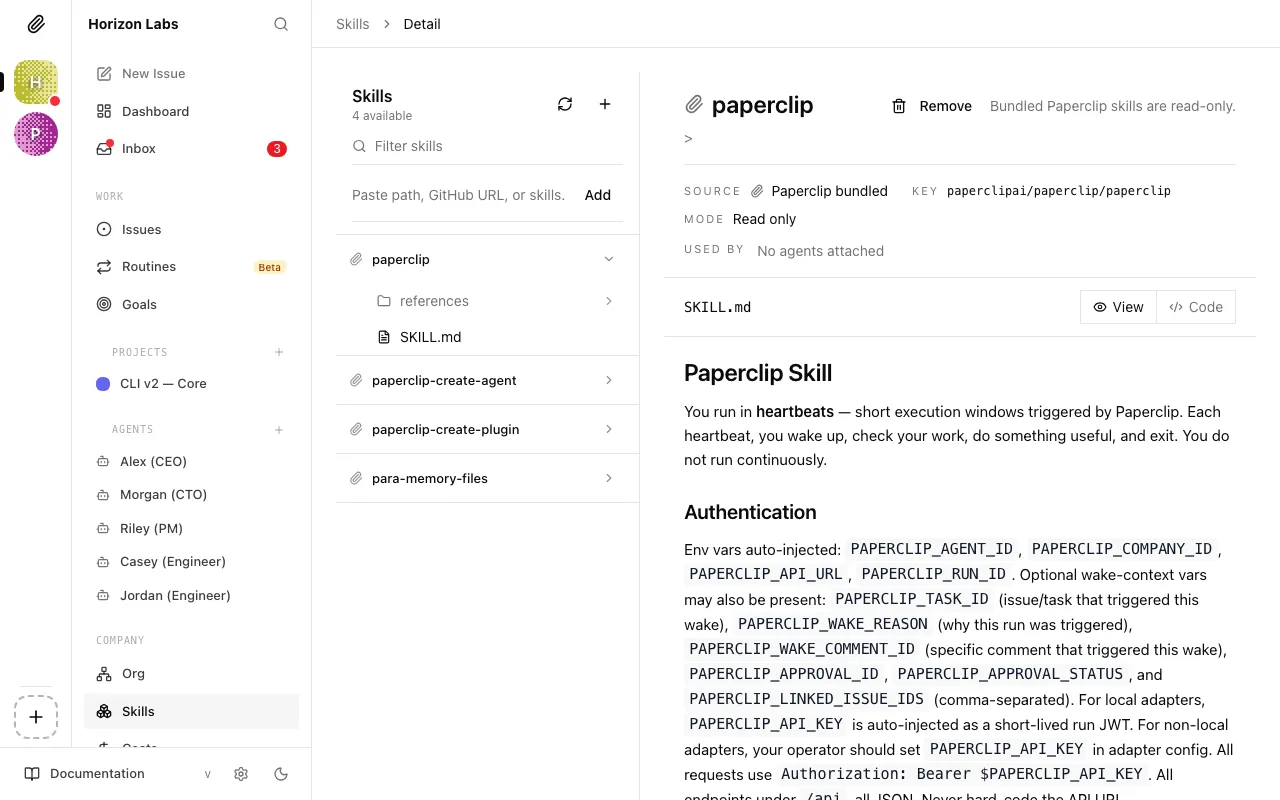
You can also browse the result in the UI under Skills, the new row shows up with its source badge (github, skills.sh, or managed) and the file inventory you wrote.
4. Assign the skill to specific agents
Section titled “4. Assign the skill to specific agents”Skills live company-wide; which agents see them is controlled by each agent’s desiredSkills. To attach the new skill to two coder agents, sync each one with a list that includes the new key:
curl -X POST "$PAPERCLIP_API_URL/api/agents/$CODER_AGENT_ID/skills/sync" \ -H "Authorization: Bearer $PAPERCLIP_API_KEY" \ -H "Content-Type: application/json" \ -d '{ "desiredSkills": [ "paperclip", "release-note-writer" ] }'The route is reconciling, not additive: anything in desiredSkills is attached, anything not in the list is detached. Always send the full set, not just the new entry. If you don’t know the agent’s current set, read it first:
curl "$PAPERCLIP_API_URL/api/agents/$CODER_AGENT_ID/skills" \ -H "Authorization: Bearer $PAPERCLIP_API_KEY"The response (an AgentSkillSnapshot) lists every entry the agent currently has, with state (configured, installed, available, etc.) and mode (the runtime sync strategy, see below). The full schema is at Skills reference → Assigning skills to agents.
Each desiredSkills entry can be:
- a canonical key (
acme/agent-skills/release-note-writer), preferred for scripts because it’s unambiguous, - a skill UUID (
idfrom the company skills list), - or a slug (
release-note-writer), fine for one-off calls but rejected withInvalid company skill selection (ambiguous references: ...)if the slug matches more than one skill.
Bundled skills are always attached. The server unions any
paperclipai/paperclip/*bundled skills (paperclip, etc.) into every agent’s resolved set, regardless of what you send. That’s why you keeppaperclipon the list above, leaving it off doesn’t remove it; it just makes the response confusing.
Adapter sync mode matters
Section titled “Adapter sync mode matters”The snapshot’s mode field tells you what the adapter actually does with the assignment. There are three:
| Mode | Behaviour |
|---|---|
persistent | The adapter writes skill files into the agent’s working directory and leaves them there between runs. |
ephemeral | The adapter materialises files for each run and cleans up afterwards. Default for sandboxed adapters. |
unsupported | Paperclip records the assignment but cannot push files into the runtime. openclaw_gateway falls here, manage skills inside the remote runtime instead. See Bring your own agent. |
If you assigned a skill and the agent never picks it up, check the snapshot’s mode first, the assignment may be tracked-only.
5. Reuse at hire time with desiredSkills
Section titled “5. Reuse at hire time with desiredSkills”Once the skill is in the company library, you can attach it on day one when you create or hire a new agent. The same desiredSkills field is accepted on both routes:
# Direct create (no approval)curl -X POST "$PAPERCLIP_API_URL/api/companies/$COMPANY_ID/agents" \  -H "Authorization: Bearer $PAPERCLIP_API_KEY" \  -H "Content-Type: application/json" \  -d '{    "name": "Release Note Coder",    "role": "engineer",    "adapterType": "http",    "adapterConfig": { "url": "https://agent.example.com/paperclip/heartbeat", "method": "POST", "headers": {} },    "desiredSkills": [      "paperclip",      "release-note-writer"    ]  }'
# Hire request (board approval flow)curl -X POST "$PAPERCLIP_API_URL/api/companies/$COMPANY_ID/agent-hires" \  -H "Authorization: Bearer $PAPERCLIP_API_KEY" \  -H "Content-Type: application/json" \  -d '{    "name": "Release Note Coder",    "role": "engineer",    "desiredSkills": [ "release-note-writer" ]  }'
The same resolution rules apply, pass keys, IDs, or unique slugs. Unknown or ambiguous references reject the request with 422. See Handle board approvals for hires when the hire route routes through approvals.
6. Trigger the skill in a test run
Section titled “6. Trigger the skill in a test run”Now that the skill is installed and attached, prove it actually loads. Assign the agent a task whose description matches the skill’s routing description:
curl -X POST "$PAPERCLIP_API_URL/api/companies/$COMPANY_ID/issues" \ -H "Authorization: Bearer $PAPERCLIP_API_KEY" \ -H "Content-Type: application/json" \ -d '{ "title": "Draft release notes for v0.7.2", "description": "Draft release notes for the merged PRs in the v0.7.2 milestone. Use the release-note-writer skill: output the three sections (Highlights, Changes, Fixes) in that order.", "assigneeAgentId": "'"$CODER_AGENT_ID"'" }'On the agent’s next heartbeat, open its run viewer (Agents → <agent> → Runs) and inspect the transcript. If the skill loaded, you’ll see:
- the
SKILL.mdbody in the run’s tool/context output, or - the agent’s response visibly following the skill’s section order and voice rules.
If neither is true, walk down the troubleshooting checklist in the Skills reference. The two most common failures: the routing description is too vague for the agent to match, or the adapter’s sync mode is unsupported.
Tightening the description is the lever, not the body. If the agent doesn’t load the skill when it should, the body is rarely the problem. Rewrite the
descriptionto name the trigger more concretely (“Use when the user asks for release notes or a changelog…”). The body only matters once the skill is actually loaded.
7. Versioning and updates
Section titled “7. Versioning and updates”Behaviour depends on where the skill came from.
| Source | Pinned? | How to update |
|---|---|---|
| Paperclip-managed (created from the UI’s + button) | No, live | Edit in the Markdown editor on the Skills page. |
| GitHub | Yes, pinned to a commit SHA | GET /skills/{id}/update-status shows the latest commit on the tracked ref. POST /skills/{id}/install-update re-imports it. |
| skills.sh | Yes, resolves to GitHub under the hood | Same as GitHub. |
| URL / raw file | No | Re-import the URL to refresh. |
| Bundled with Paperclip | Pinned to the Paperclip release | Bundled skills can’t be edited directly. |
Promote a skill to a GitHub source as soon as you want to share it across multiple agents or companies, that’s the path that gives you reviewable diffs, a stable canonical key, and update-status tracking. The id doesn’t change when you install-update, so anything that referenced the skill by id keeps working without re-syncing.
To check for updates on a GitHub-sourced skill:
curl "$PAPERCLIP_API_URL/api/companies/$COMPANY_ID/skills/$SKILL_ID/update-status" \ -H "Authorization: Bearer $PAPERCLIP_API_KEY"Response (abbreviated):
{ "supported": true, "trackingRef": "main", "currentRef": "9f2a3b1c4d8e7f6a5b4c3d2e1f0a9b8c7d6e5f4a", "latestRef": "0a1b2c3d4e5f6a7b8c9d0e1f2a3b4c5d6e7f8a9b", "hasUpdate": true}If hasUpdate is true:
curl -X POST "$PAPERCLIP_API_URL/api/companies/$COMPANY_ID/skills/$SKILL_ID/install-update" \ -H "Authorization: Bearer $PAPERCLIP_API_KEY"8. Scoping rules to keep in mind
Section titled “8. Scoping rules to keep in mind”- Company-scoped, not org-scoped. A skill installed in Company A is invisible to Company B. To share, install the source twice: once into each company.
- No per-team or per-role gate. Granularity is
desiredSkillsper agent. Two agents in the same company can have completely different skill sets. - Bundled skills are forced on.
paperclipai/paperclip/*skills are unioned into every resolved set; you can’t drop them. - Adapter sync mode is the runtime gate. If
mode: "unsupported", the assignment exists but no files reach the runtime. Either switch adapters or manage skills in the remote runtime.
The full set of rules, required vs. optional, bundled-required, materialisation strategy, conflict resolution, is at Skills reference → Scoping rules.
9. Troubleshooting
Section titled “9. Troubleshooting”Missing permission: can create agents.
The route requires agents:create capability. Run the call as the board user, the CEO agent, or an agent with permissions.canCreateAgents=true. The same gate applies to import, scan, sync, and the per-skill detail/files routes.
Invalid company skill selection (ambiguous references: <slug>; ...).
Two installed skills share the same slug. Switch the call to use the canonical key, list /companies/{id}/skills, find the row, copy the key field, send that.
Invalid company skill selection (unknown references: ...).
The reference in desiredSkills doesn’t match any installed skill. Most often a typo or a slug from a different company. List skills first.
Skill imports but never loads at run time.
Check the snapshot: GET /api/agents/{agentId}/skills. If mode is unsupported, the adapter (e.g. openclaw_gateway) cannot sync; the assignment is metadata-only. If mode is ephemeral, the files only exist during a run, the workspace looks empty at rest. That is correct behaviour.
Frontmatter changes don’t take effect.
Paperclip’s YAML reader is intentionally narrow. Use spaces (not tabs), - for list items, and plain one-line string values for name and description. Avoid block scalars (> and |) because they are not folded by the current parser.
Bundled skill keeps re-appearing after I delete it.
That’s by design, paperclip and the other paperclipai/paperclip/* skills are re-imported on every list call.
For deeper debugging, wrong tool list, sync mode confusion, GitHub pin stuck on an old commit, walk the full troubleshooting list.
See also
Section titled “See also”- Skills guide: UI walkthrough, file inventory, write-a-good-skill checklist, trust levels.
- Skills reference: file shape, install pipeline, canonical keys, scoping, versioning.
- Agents API → Skills: request/response shapes for
GETandPOST /agents/{id}/skills/sync. - Bring your own agent: the OpenClaw / Hermes-agent / HTTP webhook paths, including the
unsupportedskill-sync caveat. - Handle board approvals for hires: when
desiredSkillslands in an approval workflow rather than direct create.